Tutorials
WRESL+ source code helps the modeler do two important things:
Define the execution structure of your study.
Define the network, constraints, and goals for your study.
Model Execution Structure
To define the execution structure of your study we mostly use
sequence, model, group, and include. These objects and
directives tell the study what MILP problems to construct, and the order
that they should be evaluated.
Below is an example that defines a 2-step study, which first solves a simple stream network problem, and then solves a more complex problem.
 1model SimpleOperations {
 2    include group StreamNetwork  // the network structure is defined in this group
 3    include 'weights.wresl'  // this file has the MILP wieght definitions
 4}
 5
 6model ComplexOperations {
 7    include group StreamNetwork
 8    include group OperationsDefinition  // in this "model" we also include operations
 9    include 'weights.wresl'
10}
11
12sequence First {
13    model SimpleOperations
14    condition always
15    order 1  // the simple model goes first
16}
17
18sequence Second {
19    model ComplexOperations
20    condition always
21    order 2  // the more complex model goes second
22}
Model Variables, Constraints, and Objective
To define the network, constraints, and goals of the study, we mostly use define, and goal objects. These objects create variables, and add constraints to the study.
Below is an example that enforces a very simple mass balance equation.
 1define INFLOW {
 2    timeseries
 3    units 'CFS'
 4    kind 'FLOW'
 5}
 6
 7define OUTFLOW {
 8    std
 9    units 'CFS'
10    kind 'FLOW'
11}
12
13define DELIVERY {
14    lower 0
15    upper 50
16    units 'CFS'
17    kind 'FLOW'
18}
19
20define BASE_FLOW {
21    value 25
22}
23
24goal MASS_BALANCE {
25    INFLOW - OUTFLOW - DELIVERY = 0
26}
27
28goal MINIMUM_FLOW_REQUIREMENT {
29    OUTFLOW > (0.25 * DELIVERY) + BASE_FLOW
30}
31
32objective objAll = {
33    [DELIVERY, 10],
34    [OUTFLOW, 1]
35}
If the INFLOW term is equal to 60, then the problem above can be visualized as the plot below:
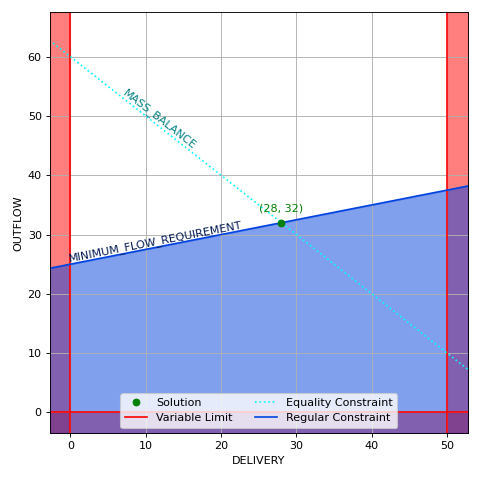
Some things to note about this problem:
The variable bounds limit all solutions to the area not shaded red.
The mass balance constraint limits all solutions to the area above the blue region.
Since
MASS_BALANCEuses an equality constraint, the solution must lie exactly on the cyan line.Since
DELIVERYhas a larger weight (10) thanOUTFLOW(1), the optimal value is at(28, 32). If the weight priority had been switched, the optimal value would be at(0, 60).